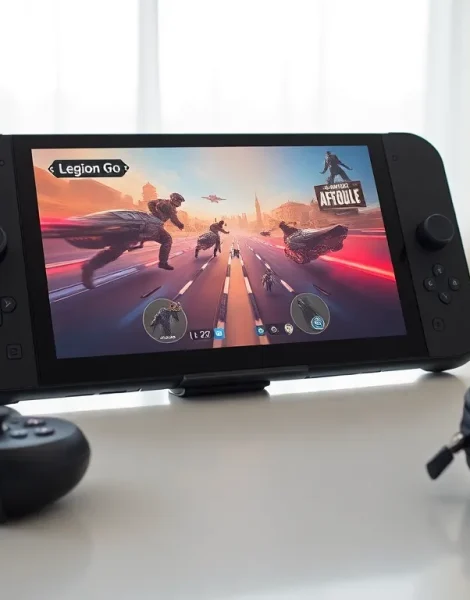
The Lenovo Legion Go has quickly become one of the most talked-about handheld gaming devices on the market. This Lenovo Legion Go guide covers everything buyers and owners need to know, from specs and setup to performance tips that make a real difference.
Lenovo entered the handheld gaming space with a device that challenges the Steam Deck and ROG Ally head-on. The Legion Go stands out with its detachable controllers, large 8.8-inch display, and Windows 11 operating system. Whether someone is considering a purchase or has already unboxed their device, this guide provides the practical information needed to get started and maximize the experience.
Table of Contents
ToggleKey Takeaways
- The Lenovo Legion Go features an 8.8-inch QHD+ display with 144Hz refresh rate and detachable controllers that transform into an FPS mouse mode.
- AMD’s Ryzen Z1 Extreme processor handles AAA games at medium settings, with better performance achieved by lowering resolution to 1200p.
- Use Legion Space software to manage games from multiple platforms and customize performance profiles from 8W to 25W TDP.
- Battery life runs 1-2 hours during intensive gaming—extend it by lowering brightness, using Balanced mode, and setting refresh rate to 60Hz.
- Windows 11 ensures broad game compatibility including Xbox Game Pass, cloud gaming services, and anti-cheat software support.
- Expand storage with a fast A2-rated microSD card and join Reddit or Discord communities for game-specific optimization settings.
Key Features and Specifications
The Lenovo Legion Go packs serious hardware into a portable form factor. Here’s what makes this device stand out.
Display and Design
The Legion Go features an 8.8-inch IPS touchscreen with 2560 x 1600 resolution. This QHD+ panel supports a 144Hz refresh rate, which delivers smooth visuals during fast-paced gaming. The screen reaches 500 nits of brightness, making outdoor play viable.
At 854 grams with controllers attached, the Legion Go is heavier than most competitors. The trade-off is that larger display and the unique detachable controller system.
Processing Power
AMD’s Ryzen Z1 Extreme processor powers the Legion Go. This APU combines 8 Zen 4 cores with RDNA 3 graphics, offering strong performance for a handheld device. The chip can handle AAA titles at reasonable settings, though expectations should be calibrated for portable hardware.
The device includes 16GB of LPDDR5X RAM and comes with either 512GB or 1TB of internal storage. A microSD card slot allows for expansion.
Detachable Controllers
The Legion Go’s detachable controllers set it apart from other handhelds. Users can remove them to play in tabletop mode with the built-in kickstand. The right controller transforms into an “FPS Mode” setup with a small base, functioning like a vertical mouse for shooters.
Hall effect joysticks and triggers should reduce drift issues over time. The controllers also include gyroscope functionality and trackpads on each side.
Setting Up Your Legion Go
Getting the Legion Go ready for gaming takes some initial setup. This Lenovo Legion Go guide walks through the essential first steps.
Initial Configuration
Out of the box, the Legion Go runs Windows 11. Users will complete standard Windows setup, including Microsoft account login and system updates. These updates can take 30-45 minutes, so patience helps here.
Lenovo Vantage comes pre-installed and handles driver updates and system optimization. Running Vantage first ensures all components have current drivers.
Legion Space Software
Legion Space serves as the primary interface for gaming on this device. This launcher organizes games from different platforms into one location. It provides quick access to Steam, Xbox Game Pass, Epic Games, and other libraries.
The software also controls performance profiles. Users can switch between Quiet, Balanced, Performance, and Custom modes depending on their needs. Custom mode allows manual TDP adjustment from 8W to 25W.
Controller Setup
The Legion Go controllers connect via the pogo pins on the device or through Bluetooth when detached. To use FPS Mode, remove the right controller and attach it to the included base.
Button mapping can be customized through Legion Space. Creating game-specific profiles saves time when switching between titles that need different configurations.
Gaming Performance and Compatibility
Performance matters most for any gaming device. The Legion Go delivers capable results, though understanding its limits helps set proper expectations.
AAA Game Performance
The Ryzen Z1 Extreme handles modern games at medium settings and native resolution. Cyberpunk 2077 runs at 30-40 FPS with medium settings. Elden Ring maintains a steady 45 FPS with optimized configurations. Starfield struggles more, typically hovering around 25-30 FPS.
Dropping resolution to 1200p or 720p significantly boosts frame rates. Many users find 1200p offers the best balance between clarity and performance on the Legion Go display.
Compatibility Considerations
Windows 11 provides broad game compatibility. Almost any PC game will run on the Legion Go, though performance varies. Anti-cheat software works without issues, unlike some Linux-based handhelds.
Xbox Game Pass integration works smoothly. Cloud gaming through Xbox or GeForce Now extends the library further, especially for demanding titles that struggle to run locally.
Emulation Capabilities
The Legion Go excels at emulation. PS2 and GameCube games run flawlessly. Switch emulation through Yuzu or Ryujinx handles many titles well, though some games require tweaking. PS3 emulation works for lighter games but struggles with demanding titles.
This versatility makes the Legion Go appealing for retro gaming enthusiasts who want one device for everything.
Tips for Getting the Most Out of Your Device
Smart settings and accessories can dramatically improve the Legion Go experience. These practical tips help users get more from their device.
Battery Optimization
The 49.2Whr battery lasts 1-2 hours during intensive gaming. Extending playtime requires some adjustments:
- Lower screen brightness to 50% when indoors
- Use Balanced or Quiet performance modes for less demanding games
- Enable AMD Radeon Super Resolution to reduce GPU load
- Set refresh rate to 60Hz instead of 144Hz for longer sessions
Carrying the 65W charger solves battery concerns during longer gaming sessions.
Storage Management
Internal storage fills quickly with modern games. A fast microSD card (A2 rated) handles game storage effectively. Moving games between internal and SD storage is straightforward through Windows.
Uninstalling pre-installed bloatware frees several gigabytes. Many users also disable Windows features they don’t need for gaming.
Accessory Recommendations
A quality carrying case protects the Legion Go during travel. The device’s size means most generic cases won’t fit, look for Legion Go-specific options.
A portable USB-C hub adds functionality: additional USB ports, HDMI output for TV play, and ethernet for stable online gaming. The Legion Go supports external GPUs through USB4, though this adds significant cost.
Community Resources
The Legion Go community on Reddit and Discord shares performance guides for specific games. These optimized settings often outperform default configurations significantly.