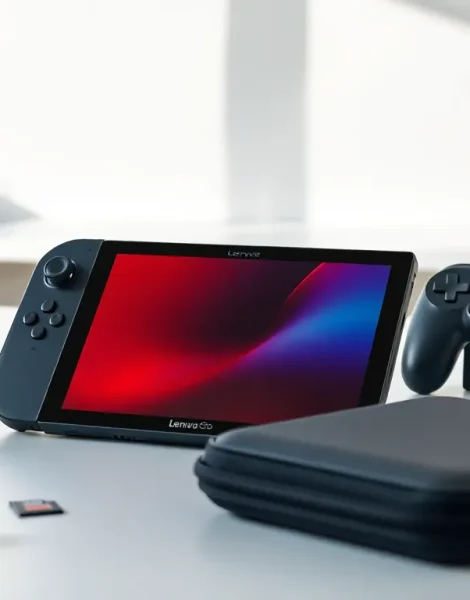
The Lenovo Legion Go offers portable gaming power, but many owners barely scratch the surface of what this device can do. With detachable controllers, a large 8.8-inch display, and Windows 11 under the hood, it’s a versatile machine waiting for the right ideas to shine.
This article explores creative Lenovo Legion Go ideas that go beyond basic gameplay. Readers will discover controller setups, essential accessories, non-gaming uses, and customization tips. Whether someone just unboxed their Legion Go or has owned it for months, these suggestions will help them get more value from their investment.
Table of Contents
ToggleKey Takeaways
- The Lenovo Legion Go’s detachable controllers can be customized for different game genres, including FPS Mode for shooters and gyro controls for racing games.
- Essential accessories like 65W power banks, USB-C docks, and external SSDs significantly enhance the Legion Go experience and address common limitations.
- Beyond gaming, the Legion Go serves as a cloud gaming hub, retro emulation machine, portable workstation, and media consumption device thanks to Windows 11.
- Performance optimization through Legion Space software lets users create custom power profiles and TDP adjustments to balance battery life and frame rates.
- Personalization options including RGB lighting, vinyl skins, and custom fan curves make the Lenovo Legion Go both unique and tailored to individual preferences.
Optimize Your Controller Setup for Different Game Genres
The Legion Go’s detachable controllers give players flexibility that most handheld gaming PCs lack. Smart users adapt their controller setup based on what they’re playing.
First-Person Shooters
For FPS games, the right controller transforms into FPS Mode. Remove it from the device, flip out the kickstand, and use it like a mouse. This Lenovo Legion Go idea gives shooters a precision advantage over traditional thumbstick aiming. Games like Counter-Strike 2 and Valorant feel more natural with this setup.
Racing Games
Racing titles benefit from trigger sensitivity adjustments. The Legion Go allows users to modify trigger dead zones through Legion Space software. Set shorter travel distances for quicker acceleration responses. Pair this with gyro controls for subtle steering corrections, it works surprisingly well in Forza Horizon 5.
RPGs and Strategy Games
For slower-paced genres, keep both controllers attached. Map frequently used abilities to the back paddles. This Lenovo Legion Go idea reduces thumb movement and keeps eyes on the action. Games like Baldur’s Gate 3 become more comfortable with custom button layouts saved per title.
Fighting Games
Fighting game fans should consider the D-pad responsiveness settings. The Legion Go’s directional inputs can be tuned for fighting game motions. Some players prefer connecting an external controller for this genre, but the built-in options work well for casual matches.
Must-Have Accessories to Enhance Your Legion Go
The right accessories turn a good Lenovo Legion Go experience into a great one. These items address common pain points and expand functionality.
Carrying Cases
A quality carrying case protects the investment. The Legion Go’s size means standard Switch cases won’t fit. Look for cases with controller compartments and accessory pockets. Some options include built-in stands for tabletop play.
External Storage
The base storage fills up fast with modern games. A quality microSD card adds hundreds of gigabytes for game libraries. USB-C external SSDs offer another Lenovo Legion Go idea, faster load times than microSD with massive capacity. Many users keep their favorite games on internal storage and older titles on external drives.
Portable Chargers
Battery life during heavy gaming sessions lasts roughly two hours. A 65W USB-C power bank extends play sessions significantly. Choose one with Power Delivery support for proper charging speeds. This accessory makes long trips and airport layovers much better.
Docking Stations
A USB-C dock transforms the Legion Go into a desktop replacement. Connect it to a monitor, plug in a keyboard and mouse, and play PC games on a big screen. This Lenovo Legion Go idea appeals to users who want one device for both portable and home gaming. Some docks include Ethernet ports for more stable online connections.
Screen Protectors
The 8.8-inch display deserves protection. Tempered glass screen protectors prevent scratches without affecting touch sensitivity. Matte versions reduce glare for outdoor play.
Best Uses Beyond Traditional Gaming
The Lenovo Legion Go runs full Windows 11. This opens possibilities that dedicated gaming handhelds can’t match.
Game Streaming Hub
Cloud gaming services like Xbox Cloud Gaming and GeForce Now work beautifully on the Legion Go. The large screen and built-in controls create an ideal streaming setup. This Lenovo Legion Go idea lets users play demanding titles without local hardware limitations. Data centers handle the heavy lifting while the device handles input and display.
Retro Gaming Machine
Emulators run perfectly on this hardware. Players can enjoy classics from older consoles through software like RetroArch. The controller layout handles most retro games without configuration. This turns decades of gaming history into a portable library.
Productivity Device
Surprisingly, the Legion Go handles light work tasks. Email, web browsing, document editing, and video calls all function smoothly. Pair it with a Bluetooth keyboard for a portable workstation. Some users take it to coffee shops for both work and gaming breaks.
Media Consumption
The display quality makes movies and shows look great. Netflix, YouTube, Disney+, and other streaming apps run through browsers or dedicated Windows applications. The kickstand props the device up at comfortable viewing angles. It’s a capable travel entertainment system beyond gaming.
Creative Applications
Artists use the touchscreen for digital sketching with stylus support. Music producers run lightweight DAWs for on-the-go production. These Lenovo Legion Go ideas show that the device serves creative professionals too.
Customization Tips for Performance and Aesthetics
The Legion Go rewards users who spend time tweaking settings. Both performance gains and visual personalization make the device feel unique.
Power Profile Management
Legion Space software includes power profiles. Create custom profiles for different scenarios. A battery-saving profile extends playtime for indie games. A performance profile pushes hardware for demanding titles. Switching between them takes seconds and noticeably affects both performance and battery drain.
TDP Adjustments
Advanced users adjust TDP (Thermal Design Power) limits. Lower TDP settings reduce heat and extend battery life. Higher settings increase frame rates at the cost of thermals. This Lenovo Legion Go idea requires some experimentation to find the sweet spot for each game.
Display Settings
The 144Hz display supports variable refresh rates. Enable VRR for smoother visuals without screen tearing. Adjust brightness based on environment, lower settings indoors save battery while higher settings combat outdoor glare. Color profiles can be tweaked for personal preference.
Controller RGB Lighting
The controllers feature customizable RGB lighting. Match colors to favorite games or create unique patterns. Some users sync lighting with in-game events through third-party software. This aesthetic Lenovo Legion Go idea makes the device stand out.
Skin and Decal Applications
Vinyl skins protect the exterior while adding personality. Companies offer designs ranging from subtle textures to bold graphics. Installation takes patience but transforms the device’s appearance. Skins also add grip and prevent fingerprint smudges.
Fan Curve Optimization
Custom fan curves balance noise and cooling. Aggressive curves keep temperatures low during intense sessions. Quieter curves suit media consumption and lighter games. Finding the right balance improves the overall experience.